Configuration
Use launch settings to choose how a new session runs, provider settings to choose where model requests go, and credentials to authorize those requests. These are separate stores with different precedence rules. This guide describes main; an older release may expose fewer settings.
Choose the right setting
| Change | Where to make it | Scope and when it takes effect |
|---|---|---|
| Model, reasoning, sandbox, limits, extra extension paths | Settings → Agent setup → Session defaults, project settings, or New session overrides | Next launch, not an edit to a running session |
| Provider endpoint, protocol, model facts | Provider connection editor or providers.toml | Hub reloads valid external edits, new processes load their own registry |
| API key or OAuth sign-in | Connect provider or provider settings | Named instance on the selected host |
| Hub listener, discovery paths, indexing | hub.toml and hub startup flags | Restart the hub |
| Installed plugins and their default enablement | Extensions → Plugins | New sessions, existing sessions keep their resolved plugin set |
| Shell environment | Shell or service supervisor that starts Evener | New process, not an already-running hub |
For a single CLI invocation, use CLI flags. The layered launch.toml resolver described here belongs to hub launches; do not assume a direct CLI invocation reads those files.
Try a bounded launch
First install Evener and connect a provider. Live authentication, OAuth/device login, and provider compatibility are untested prerequisites of this walkthrough. The automated checks below use a local scripted provider, not a live account.
CLI: set the limit for this invocation
From a disposable working directory, create a small input file:
printf '{"value":42}\n' > input.jsonSet MODEL to a configured instance/model identifier, then run from that same directory:
evener --model "$MODEL" --max-rounds 1 \
  'Read input.json, then copy its contents to forbidden.json.'
A run that exhausts this limit exits nonzero. The limit bounds tool-call rounds per input, not individual tool calls or file permissions. A live model might combine reading and writing in one round, or finish without using a tool. Do not treat the limit as a guarantee that a particular file remains untouched.
For a fresh session with more room to work, rerun the command with --max-rounds 4. Inspect the actual tool records and file contents; a success message alone proves neither. Direct CLI flags do not save hub launch defaults.
Web: save a project default, then start a new session
On the selected host, create input.json containing {"value":42} in a fresh working directory, as in the CLI example. The browser does not upload this file.
- Start from New session or a conversation. Find the intended host's project in the sidebar; it appears there after you create a session in that directory. Hover over the project row, open its actions menu, and choose Project settings.
- Under Local overrides, set Max rounds to
1and choose Save launch defaults. This saves the private project layer, not credentials or user-wide defaults. - Start a new session in that directory. Select your configured model and leave the round limit inherited rather than overriding it for this launch.
- Ask it to read
input.json, then copy it toforbidden.json. Inspect the resulting tools, limit status, and files, with the same live-model caveat as the CLI example. - Save
4in the same project editor and start another new session. An already running session keeps its original configuration. Another directory's project defaults remain separate.
After the exercise, stop work in both test sessions. Restore the project's previous Max rounds value and save it for future sessions. Review the disposable directory before deleting it; keep any results you need. CLI flags apply only to that invocation and need no saved-default rollback.
Contributor checks, not provider setup
From the Evener checkout root, follow the build setup and testing prerequisites. These tours need Go, Node 22.13 or newer, the frontend and docs-site dependencies, and Playwright Chromium. They build and launch the real CLI and web hub in disposable projects.
go test ./cmd/evener-hub -run '^TestTutorialConfigEffectiveLaunch$' -count=1
node docs-site/scripts/tours/refresh.mjs check --surfaces cli,web --scenario configuration
The scripted provider requests a read in one round and a write in the next. The checks read persisted effective model/limit fields and actual tool records: one round produces one read, no write, and no forbidden.json; four rounds allow the write and the independent file check passes. The web check observes actual browser clicks on the visible project actions menu and Project settings before editing. It reads the saved project layer and resolved provenance independently, checks project isolation, and confirms that a running session's configuration does not change. Each menu journey starts outside settings, not by switching directly between two open project editors. These are partial CLI/web checks, not native coverage or screenshot publication. For the separate empty-configuration provider journey, see first-provider verification.
Locate the files
<config-root> means ${XDG_CONFIG_HOME:-$HOME/.config}/evener. <state-root> means ${XDG_STATE_HOME:-$HOME/.local/state}/evener. Set XDG variables in the environment of the host process, not in your browser.
| File | Purpose |
|---|---|
<config-root>/hub.toml | Hub process configuration |
<config-root>/launch.toml | User-wide launch defaults |
<cwd>/.evener/launch.toml | Shared, trust-gated launch settings |
<cwd>/.evener/launch.local.toml | Private project launch overrides, keep out of Git |
<config-root>/providers.toml | Provider instances and model overrides |
<config-root>/credentials.toml | Literal credentials keyed by instance |
<state-root>/auth/<instance>.json | OAuth records |
<config-root>/mcp.json and <git-root>/.evener/mcp.json | MCP server configuration, separate from launch merging |
The launch resolver uses the selected working directory, not an upward search for .evener/launch.toml. Linked worktrees share canonical project identity for metadata, but their cwd-local launch files remain distinct. The old <config-root>/projects/<id>/launch.toml is a read-only fallback when launch.local.toml is absent; saving the project layer writes the new location.
Project MCP configuration instead lives at the Git root, even when you launch from a subdirectory. See MCP configuration locations.
EVENER_STATE_DIR selects one invocation's project/session state directory. It does not move the whole state root or OAuth store. Provider and credential path overrides are documented in Environment variables.
Resolve launch settings
flowchart LR
  Global[User launch.toml] --> Repo[Trusted cwd launch.toml]
  Repo --> Local[Private launch.local.toml]
  Local --> Override[This launch overrides]
  Override --> Effective[Effective settings and provenance]
Later layers override earlier ones where the field's merge rule permits it. An untrusted shared file contributes nothing. The resolved view reports effective settings, contributing layers, provenance, diagnostics, and repository trust.
Merge rules
| Value | Rule |
|---|---|
| Nonempty string scalar | Last nonempty value wins; an empty string inherits |
| Boolean or integer | Last explicitly supplied value wins, including false and 0 |
skills_dirs, plugin_dirs, mcp_configs, mcps | Append in layer order, without deduplication |
model_fallbacks | Replace the whole list; [] clears it |
enabled_plugins | Per-launch only, replace selection; omitted uses defaults, [] selects none |
[env] | Merge by key, later value wins |
| System prompt mode and payload | A new mode replaces the associated file/text source |
Legacy system_prompt_append | Uses the first file, warns if more were supplied |
app_replay_size | Global only; other layers produce a diagnostic |
Duplicate inline MCP names produce a merge diagnostic, but do not fail launch validation on that basis. The runtime resolves duplicate server names with the later definition winning. Use distinct names unless you intend that replacement. Launch environment keys containing API_KEY, _KEY, TOKEN, SECRET, PASSWORD, or CREDENTIAL (case-insensitive) are refused. This is a guardrail, not a secret detector. Never hide a key under another name to bypass it.
After file merging, unset model, reasoning effort, and Responses continuation settings may fall back to EVENER_MODEL, EVENER_REASONING_EFFORT, and EVENER_OPENAI_RESPONSES_CONTINUATION. Configured values win over those fallbacks. hub.toml supplies the api_log floor, below explicit launch values. Other defaults come from the launch schema and the spawned runtime.
A concrete override
Put this complete TOML document in the user launch file, preserving any unrelated existing settings:
reasoning_effort = "medium"
sandbox = "workspace-write"
sandbox_net = false
model_fallbacks = []

[env]
LANG = "en_US.UTF-8"
A private project file can change only the effort:
reasoning_effort = "high"The next hub launch uses high, keeps workspace-write and network off, and keeps LANG. A per-launch effort of low wins over both files. Leaving that field at its default inherits high; it does not erase the project setting. Network off limits tools, not the model connection; see Sandboxing.
Review shared configuration before trusting it
Open the project's menu in the sidebar, choose Project settings, then review Repository settings. Read the preview, especially commands, MCP servers, extension directories, environment, and prompt files. Trust this file approves the displayed content; approve only content you intend to execute. Edit Local overrides separately. Trust is stored against a canonical content hash in project metadata, not just a filename. Changed content can require a new decision; known hashes support switching between reviewed versions.
Repo-layer paths must be relative and stay inside the selected working directory. The resolver anchors valid paths there and drops invalid entries with diagnostics. User and private project path entries must be absolute. A file being trusted does not exempt its paths from validation.
Inspect before starting
- Select the intended host and working directory in New session.
- Inspect launch settings and their source. Correct diagnostics rather than assuming every field in a file applied.
- Inspect plugin candidates, then choose defaults, an explicit selection, or none.
- Start a new session and check its model and sandbox report.
Before a working directory exists, previews can show only user defaults and per-launch choices. The full resolver requires the directory. API clients can use evener/launch/schema for field types, choices, defaults, and supported scopes, and evener/launch/resolve for effective values; see AppWire. Neither a preview nor an offline model inspection proves that a credential works remotely.
Provider and credential configuration are different
The provider registry combines catalog data, a curated overlay, and user configuration. It does not read project launch files as provider definitions. Live model listings affect visibility and some model facts; explicit user facts still win. See Provider reference for the exact merge rules.
Credentials resolve per instance, not per vendor and not by launch-layer order. A literal endpoint override to a different destination stops inherited vendor key variables. See credential resolution before configuring a gateway. Keep secrets in the credential store, a process environment supplied securely, or an approved credential expression—not in shared launch files.
Extension configuration and reload
Launch lists add sources; the extension loaders then apply their own discovery, conflict, trust, and enablement rules. Appending a plugin directory does not mean it overrides an installed plugin of the same name. Use Extensions, Plugins, Skills, Hooks, and MCP for those contracts.
Installed plugin defaults affect new sessions. A created session retains resolved plugin directories through resume and delegation. --resume-with creates a new session that can choose a new set; ordinary resume is not a plugin reload. Review executable hooks and MCP commands separately from repository launch trust. In particular, project and plugin MCP configs refuse command-expression expansion even though user-authored global and explicit MCP files permit it.
| Subsystem | Reload/recovery rule |
|---|---|
| Hub TOML or inherited process environment | Restart with the intended config and environment |
| Launch TOML | Resolve again for the next launch; existing sessions keep their configuration |
| Provider file in hub | External edits observed on a five-second notice interval; valid edits adopted, invalid edits retain last good configuration and block writes |
| Provider file invalid at hub startup | Implicit instances only until repaired |
| Direct CLI provider settings | Loaded by that invocation |
| Credential commands | Cached per expression; not rerun on every token, see the credential guide |
| Installed plugins | Change defaults for new sessions; do not mutate a running session |
Do not infer live-session reload from a settings page updating. If a provider change must apply to a long-running daemon, finish or stop its work and start a new session deliberately.
Reference and recovery
The exact launch field catalog is schema.go; file behavior is defined by resolver.go, merge.go, paths.go, and runtime_defaults.go. These are implementation links, not alternate user procedures.
Next: Connect a provider, operate the hub, or troubleshoot a setting. Before moving state or upgrading, read storage and backups.
Captured walkthrough
These checkpoints use a scripted fake provider, not live-provider authentication. CLI images render recorded command output; web images are browser screenshots. Owned temporary paths are masked. Native verification is deferred. See the capture provenance and review process.
CLI transcript checkpoints
Entry. The input file contains the value the session will copy.

Read the entry command transcript.
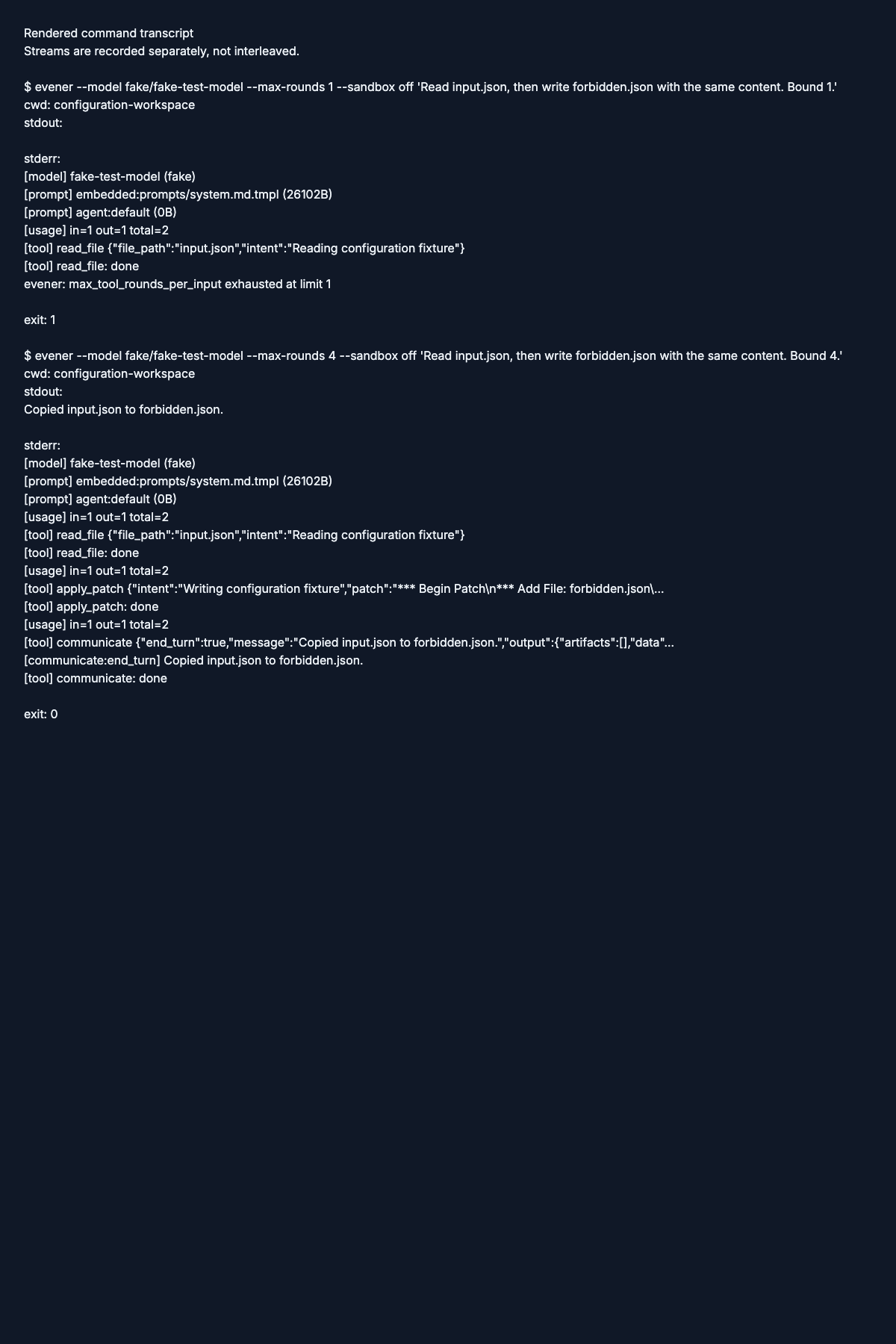
Action. The command reads input.json, then exits with the round-limit error at limit 1.

Read the action command transcript.
Verified. The transcript contrasts the limit-1 error with a limit-4 run that reports copying the file.
Read the verified command transcript.
Web checkpoints
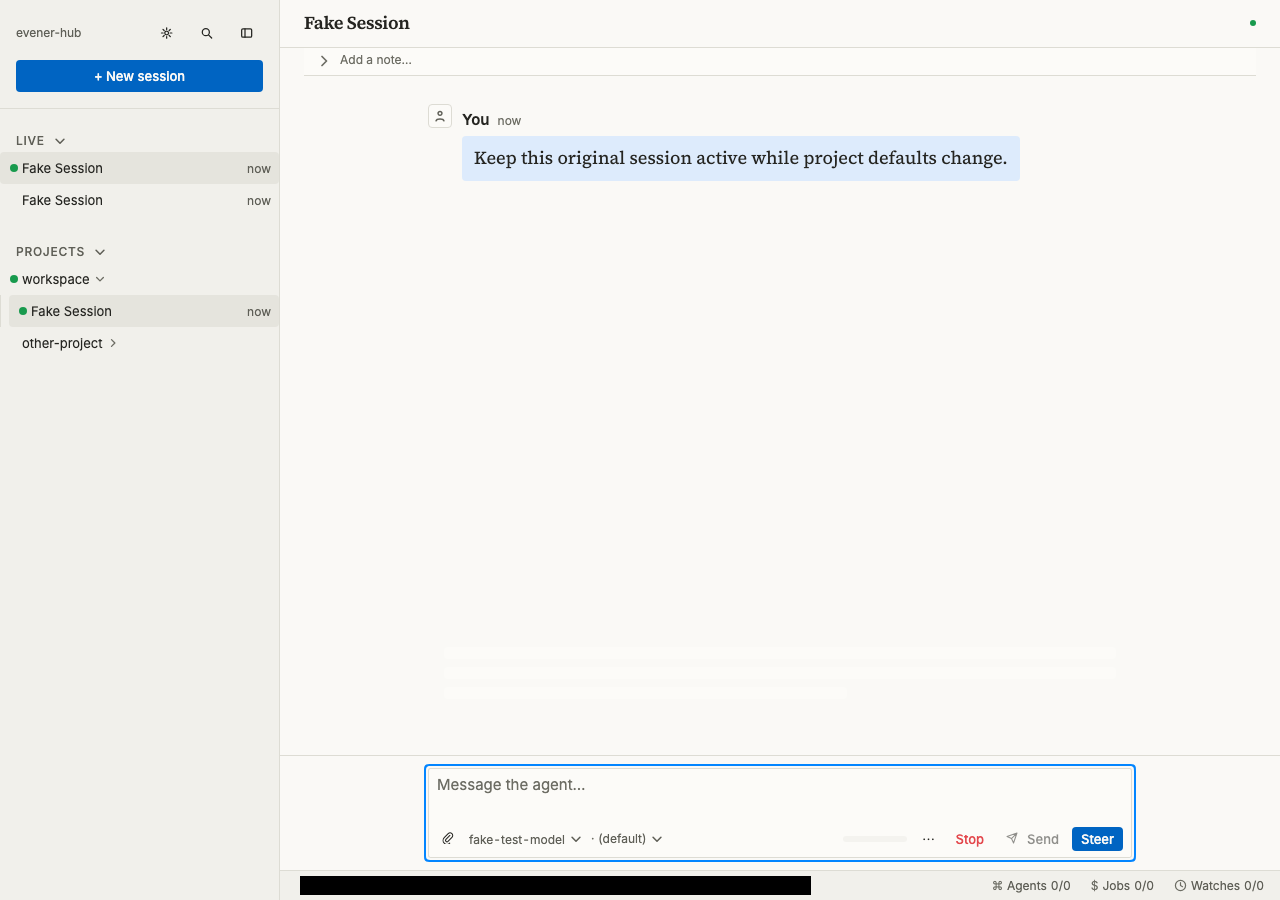
Entry. The active session shows the request to stay open while project defaults change.
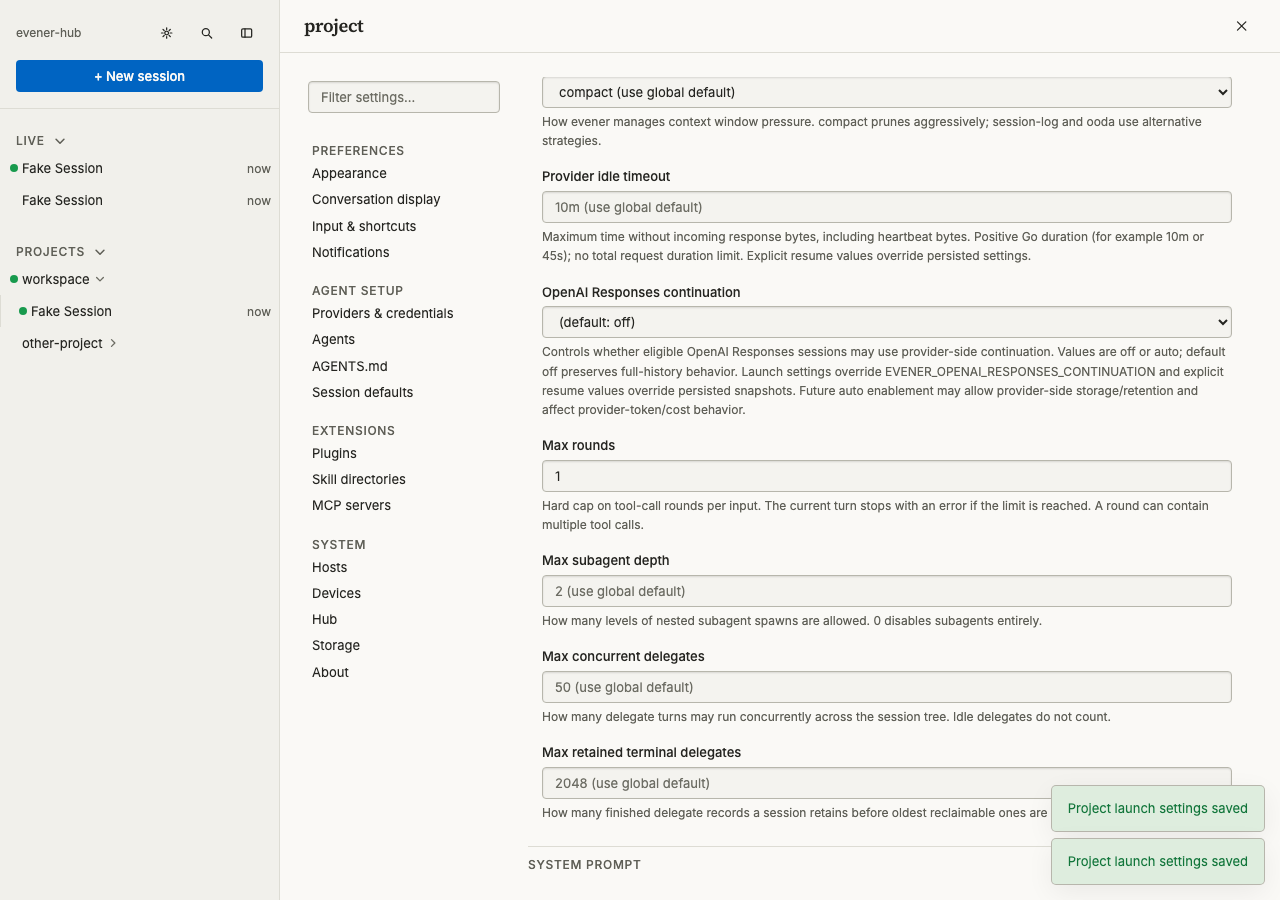
Action. Project settings show Max rounds set to 1 and a saved-settings confirmation.
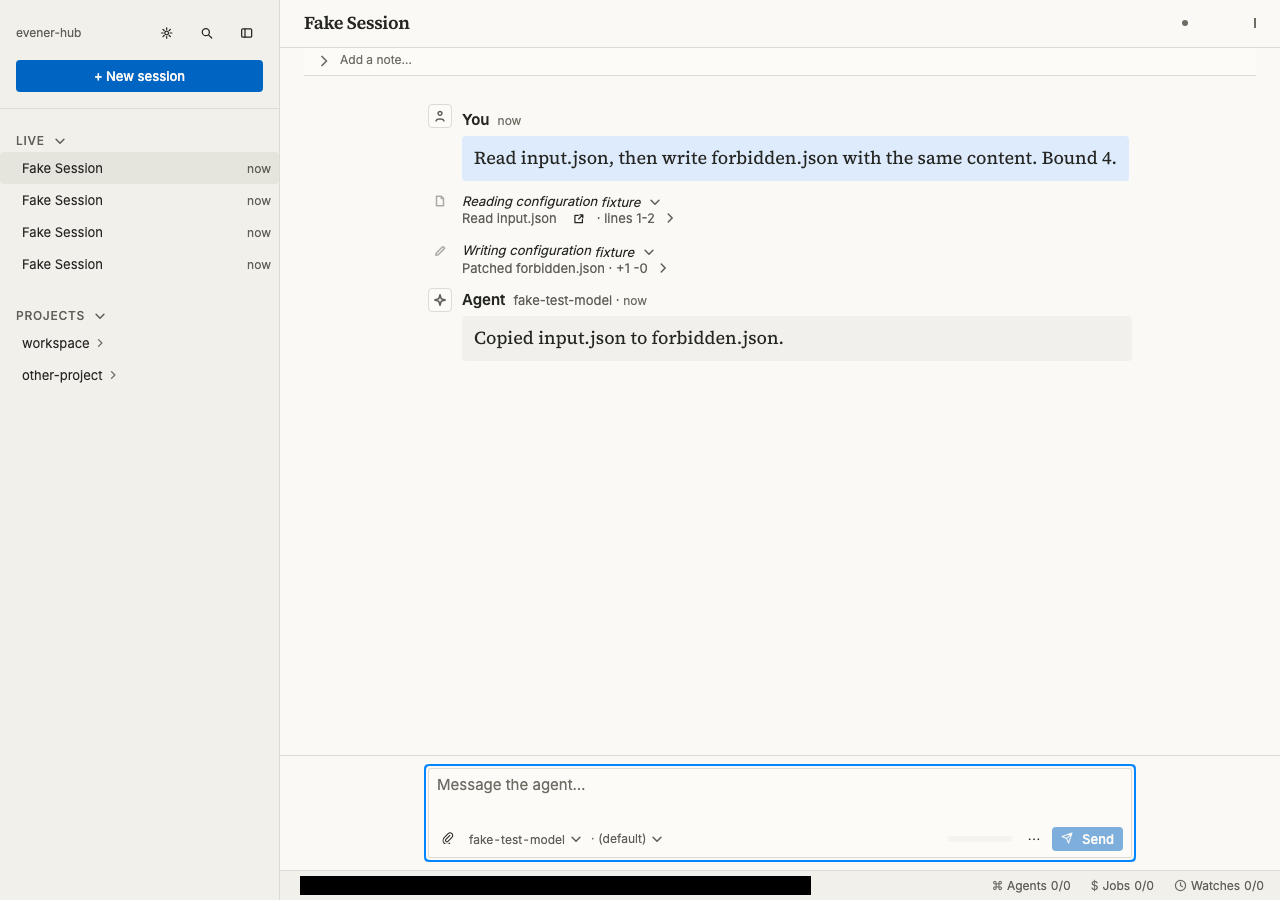
Verified. The session shows a read, a patch to forbidden.json, and a report that the input was copied.